Updated
myCliniBot does not replace your practice management system and does not ask you to integrate with it. It works beside it. You write the note in myCliniBot, copy it, and paste it into the record you already keep. This guide covers the three things that make that arrangement feel seamless: Companion Mode, the mobile workflow, and the team patterns practices have settled into.
Companion Mode: a floating window over your PMS
Companion Mode opens myCliniBot in a floating window that stays on top of your practice management software, Dentally, EXACT or anything else. You keep the patient chart open and document in myCliniBot at the same time, with no tab switching and no juggling applications.
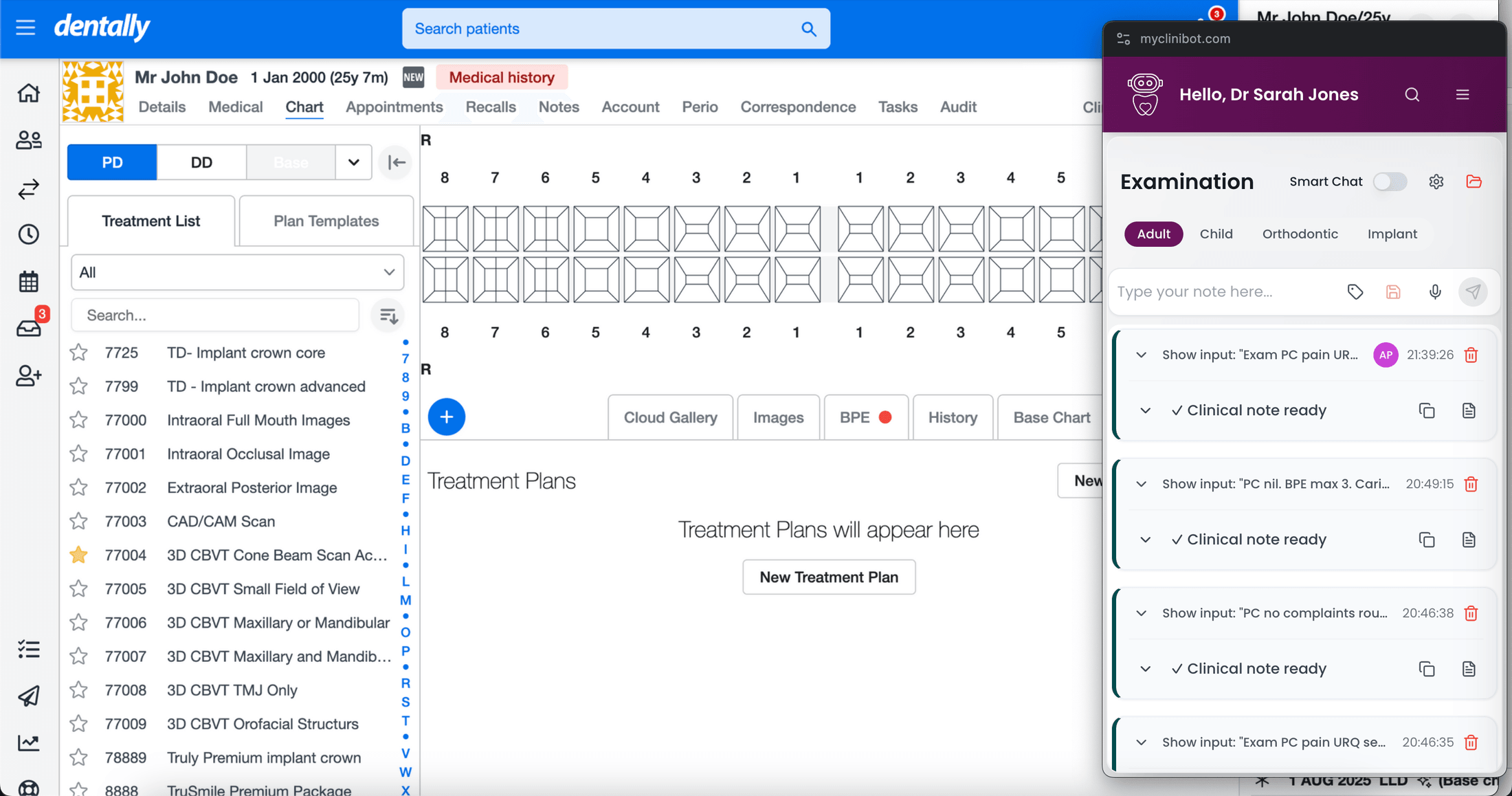
- Both systems at once. View radiographs and the chart in your PMS while the note builds in myCliniBot, then copy it across without leaving the screen.
- Built for the small window. The search icon opens a compact procedure selector, so switching from Examination to Emergency takes two clicks even in a narrow floating window.
- Smart Chat still fits. Expand Smart Chat to full screen when you need the whole questionnaire, and close Companion Mode to return to the main window when you are done.
Your phone as a dictation mic
Open myCliniBot in your phone's browser and the microphone works exactly as it does on desktop. Dictate the note on your phone, press Send, and it appears on your desktop instantly. Everything stays in sync across devices in real time.
The pattern practices like most is the relay: the nurse starts the note on desktop, captures history and early findings, and saves a draft. You pick that draft up on your phone, dictate findings, diagnosis and plan, and send. The finished note is waiting on the desktop before you are back at the chair.
Six workflows that practices actually use
There is no prescribed way to run myCliniBot. These are the patterns real teams have settled into, and most practices mix several depending on the appointment.
Solo entry at the end
After the patient leaves, type a quick summary, complaint, findings, diagnosis, plan, recall, and press Send. The whole thing takes less time than the kettle.
Live typing by the nurse
The nurse types into the main input while you talk to the patient. You add diagnosis and plan at the end, then send.
Nurse starts, draft for later
The nurse enters details during the consult, tags the patient's initials and saves. You finish the note between patients or at the end of the session.
Smart Chat for structured entry
For examinations and emergencies, the nurse works through the Smart Chat template, selecting tags and filling fields while you speak with the patient.
Nurse entry plus dentist dictation
The nurse records history and findings and saves a draft. Later, you open it in Companion Mode, review the radiographs and dictate diagnosis, discussion and plan. One complete note comes out.
Split between charting and myCliniBot
The nurse keeps myCliniBot docked beside the PMS in Companion Mode, moving between charting and note entry throughout the appointment.
Common questions about Companion Mode
- Does myCliniBot integrate with my practice management system?
- It works alongside any PMS rather than plugging into one. Notes are copied and pasted across, which means there is nothing to install, no integration to maintain, and no data migration. It works with whatever system you run today.
- Do I need to install anything?
- No. myCliniBot runs in the browser on desktop and mobile. Companion Mode is a browser feature too, best used in Chrome.
- Can my nurse and I work on the same note?
- Yes, that is the point of drafts. One person starts the note, saves it, and the other picks it up on any device with everything preserved.